BEST Computer Centre

BEST Computer Centre မွ ႀကိဳဆိုပါသည္။

အမွတ္ (၁၇၉)၊ မဂၤလာလမ္း၊ ေၾကာင္ငယ္ရပ္၊ ၿမိတ္ၿမိဳ႕။ ဖုန္း - ၀၅၉ ၄၂ ၉၇၀၊ ၀၅၉ ၄၂ ၅၀၆

BEST Computer Centre

BEST Computer Centre မွ ႀကိဳဆိုပါသည္။

အမွတ္ (၁၇၉)၊ မဂၤလာလမ္း၊ ေၾကာင္ငယ္ရပ္၊ ၿမိတ္ၿမိဳ႕။ ဖုန္း - ၀၅၉ ၄၂ ၉၇၀၊ ၀၅၉ ၄၂ ၅၀၆

BEST Computer Centre

BEST Computer Centre မွ ႀကိဳဆိုပါသည္။

အမွတ္ (၁၇၉)၊ မဂၤလာလမ္း၊ ေၾကာင္ငယ္ရပ္၊ ၿမိတ္ၿမိဳ႕။ ဖုန္း - ၀၅၉ ၄၂ ၉၇၀၊ ၀၅၉ ၄၂ ၅၀၆

BEST Computer Centre

BEST Computer Centre မွ ႀကိဳဆိုပါသည္။

အမွတ္ (၁၇၉)၊ မဂၤလာလမ္း၊ ေၾကာင္ငယ္ရပ္၊ ၿမိတ္ၿမိဳ႕။ ဖုန္း - ၀၅၉ ၄၂ ၉၇၀၊ ၀၅၉ ၄၂ ၅၀၆

Showing posts with label Root လုပ္နည္းမ်ား. Show all posts

Sunday, February 22, 2015

How to Root Sony Xperia L (C2104/C2105) Jelly Bean 4.1.2 [Build 15.0.A.1.31/15.0.A.1.36]

So Finally an easy rooting method is available for Xperia L (C2104/C2105) Jelly Bean [Build 15.0.A.1.31/15.0.A.1.36] . Thanks to DooMLoRD for the root method.

To root the latest Jelly Bean 4.2.2 Build 15.3.A.0.26, READ THIS.

Disclaimer : I am not responsible if you brick your phone or if u make any other damage to your phone

So Lets Start :

1. First of all make sure, your Build number is 15.0.A.1.31 OR 15.0.A.1.36 . Go to Settings > About phone to verify this

2. Download This File  - DooMLoRD_Easy-Rooting-Toolkit_v17_perf-event-exploit and extract it completely using WinRAR or WinZip.

3. Enable USB debugging from Settings > Developer Options.

4. Enable Unknown sources from Settings > Security

5. [Optional] Increase screen timeout to 10 minutes

6. Connect USB Cable to phone , then connect it to your Computer.

7. Now go to the Folder where you extracted the downloaded file from Step 2, and execute "runme_win.bat"

Note :- This toolkit works on Windows , Linux as well as MAC , Linux users Run "runme_linux.sh" and MAC users Run "runme_mac.sh".

8. Read and Follow the instructions on the screen!

9. REBOOT THE DEVICE AFTER THE SCRIPT HAS FINISHED EXECUTION!!!


Note : This method works on both locked and unlocked bootloader devices!!!


If you have any problems feel free to comment :)


Source - XDA

How to Root Sony Xperia P / Xperia Go on 4.1.2 Jelly Bean [Build 6.2.A.1.100]


So Finally an easy rooting method is available for Xperia P and Go Jelly Bean [Build 6.2.A.1.100]. Thanks to DooMLoRD for the root method.

Disclaimer : I am not responsible if you brick your phone or if u make any other damage to your phone

So Lets Start :

1. First of all make sure, your Build number is 6.2.A.1.100. Go to Settings > About phone to verify this

2. Download This File  - DooMLoRD_Easy-Rooting-Toolkit_v17_perf-event-exploit and extract it completely using WinRAR or WinZip.

3. Enable USB debugging from Settings > Developer Options.

4. Enable Unknown sources from Settings > Security

5. [Optional] Increase screen timeout to 10 minutes

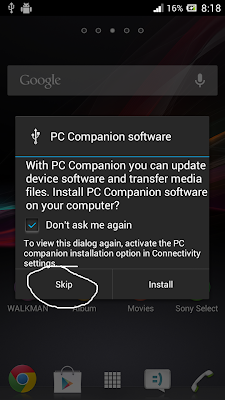
6. Connect USB Cable to phone , then connect it to your Computer. On your phone Skip the PC Companion Companion prompt (if it appears),  see screenshot below.


7. Now go to the Folder where you extracted the downloaded file from Step 2, and execute "runme_win.bat" (Windows User)

Note :- This toolkit works on Windows , Linux as well as MAC , Linux users Run "runme_linux.sh" and MAC users Run "runme_mac.sh".


8. Read and Follow the instructions on the screen!

9. REBOOT THE DEVICE AFTER THE SCRIPT HAS FINISHED EXECUTION!!!


Note : This method works on both locked and unlocked bootloader devices!!!


If you have any problems feel free to comment :)


Source - XDA

How to Root LG Google Nexus 5 ( hammerhead ) on Android 5.0 Lollipop

Android 5.0 Lollipop was released for Nexus 5 , here is the tutorial to root your Google Nexus 5 aka hammerhead.


Disclaimer : I am not responsible if you brick your phone or if u make any other damage to your phone, this method will unlock your bootloader and wipe your data so backup all your data and proceed.

So Lets Start :

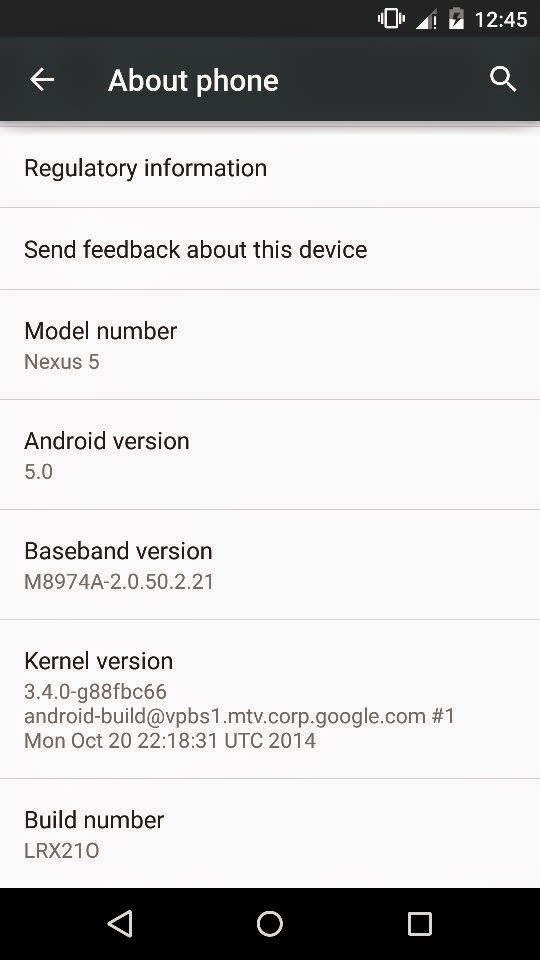
1. First make sure you are running Android Lollipop 5.0 . Go to Settings > About to verify this.


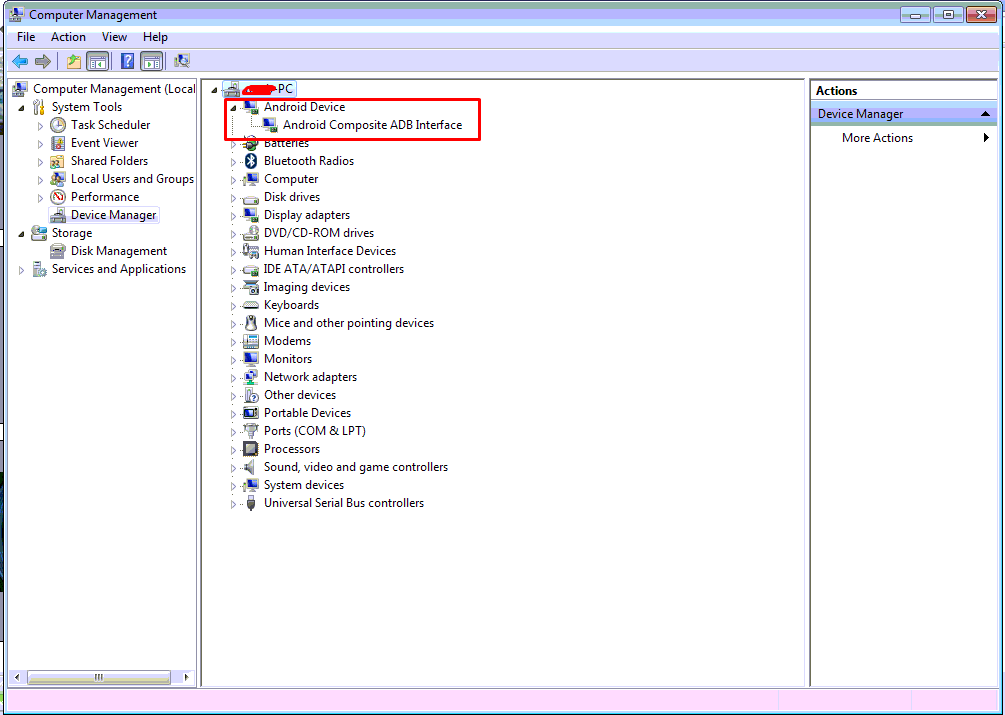
 2. Connect USB Cable to phone , then connect it to your Computer. Now open Device Manager , Right Click My Computer > Manage > Device Manager , make sure you have ADB Drivers installed, if it is installed you will see Android Device Listed, see below screenshot. 


NOTE :- If you dont have ADB Drivers installed download the drivers from here - http://developer.android.com/sdk/win-usb.html
Extract the file.
If the drivers are not installed you will see exclamation mark in Yellow triangle , right click on it Select Update Driver Software > Browse my Computer for driver software , now select the location of the file u downloaded and extracted from the above link.

3. Download this file - CF-Auto-Root-hammerhead-hammerhead-nexus5.zip and extract it completely

4. Disconnect your phone , Power off the phone , now Press and Hold Volume Down, Volume Up and Power simultaneously. You will see Fastboot mode in your mobile , connect your phone to your computer now.

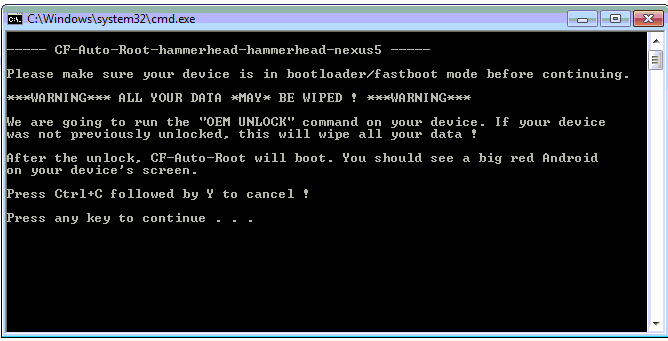
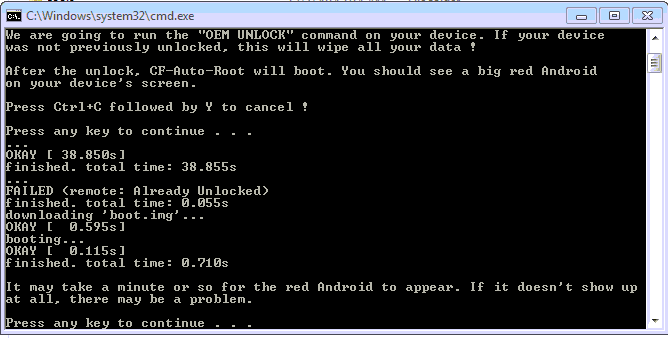
5. Now goto the folder where u extracted CF-Auto-Root-hammerhead-hammerhead-nexus5.zip and run "root-windows.bat" , the rooting process will start ( if your device is properly connected in fastboot mode) , your device will reboot.


THATS IT YOUR PHONE IS NOW ROOTED.


If you have any problems feel free to comment :)

How to Root / Unroot Xiaomi Redmi 1S ( armani ) running Android Jelly Bean 4.3 ( MIUI 5 - MIUI-JHCMIBH45.0 )

Here is the tutorial for rooting and unrooting Xiaomi Redmi 1S running Android Jelly Bean 4.3 , MIUI 5 - MIUI-JHCMIBH45.0


Disclaimer : I am not responsible if you brick your phone or if u make any other damage to your phone  

You can use the same method to root any other older version also :)

Rooting :

1. First make sure you are running the same build i.e Android 4.3 , MIUI Version : MIUI-JHCMIBH45.0. Goto Settings > About to verify this.


2. Download this File - update.zip and copy it to the root of your Internal Storage.

3. Enable USB Debugging , Go to Settings > About phone and tap 5 times on Android Version to enable Developer option.

4. Reboot your phone to Recovery ( Open Updater app from Tools , Press the Menu / Options button and select Reboot to Recovery mode )


5. Now Select and confirm "Install update.zip to System" , this will take a few seconds. ( Use the Volume Up / Down to navigate and the Power Button to Select )


6. Now select and confirm Reboot. ( Reboot to System )

7. Open Security App , Select Permissions and Turn On the Root permission


THATS IT YOUR PHONE IS NOW ROOTED.


UnRooting :

1. Download this File - UnRoot Redmi 1S.zip , rename it to update.zip and copy it to the root of your Internal Storage.

2. Open Security App , Select Permissions and Turn OFF the Root permission


3. Reboot your phone to Recovery ( Open Updater app from Tools , Press the Menu / Options button and select Reboot to Recovery mode )

4. Now Select and confirm Install update.zip to System , this will take a few seconds.

5. Now Select and confirm Reboot. ( Reboot to System )

YOUR PHONE IS NOW UNROOTED. 
  

If You Have Any Problems Feel Free To Comment :)

How to Root / Unroot Xiaomi Redmi 1S ( armani ) running Android Jelly Bean 4.3 ( MIUI 5 - MIUI-JHCMIBH45.0 )

Here is the tutorial for rooting and unrooting Xiaomi Redmi 1S running Android Jelly Bean 4.3 , MIUI 5 - MIUI-JHCMIBH45.0


Disclaimer : I am not responsible if you brick your phone or if u make any other damage to your phone  

You can use the same method to root any other older version also :)

Rooting :

1. First make sure you are running the same build i.e Android 4.3 , MIUI Version : MIUI-JHCMIBH45.0. Goto Settings > About to verify this.


2. Download this File - update.zip and copy it to the root of your Internal Storage.

3. Enable USB Debugging , Go to Settings > About phone and tap 5 times on Android Version to enable Developer option.

4. Reboot your phone to Recovery ( Open Updater app from Tools , Press the Menu / Options button and select Reboot to Recovery mode )


5. Now Select and confirm "Install update.zip to System" , this will take a few seconds. ( Use the Volume Up / Down to navigate and the Power Button to Select )


6. Now select and confirm Reboot. ( Reboot to System )

7. Open Security App , Select Permissions and Turn On the Root permission


THATS IT YOUR PHONE IS NOW ROOTED.


UnRooting :

1. Download this File - UnRoot Redmi 1S.zip , rename it to update.zip and copy it to the root of your Internal Storage.

2. Open Security App , Select Permissions and Turn OFF the Root permission


3. Reboot your phone to Recovery ( Open Updater app from Tools , Press the Menu / Options button and select Reboot to Recovery mode )

4. Now Select and confirm Install update.zip to System , this will take a few seconds.

5. Now Select and confirm Reboot. ( Reboot to System )

YOUR PHONE IS NOW UNROOTED. 
  

If You Have Any Problems Feel Free To Comment :)

How to Root / Unroot Xiaomi Redmi 1S ( armani ) running Android Jelly Bean 4.3 ( MIUI 5 - MIUI-JHCMIBH45.0 )

Here is the tutorial for rooting and unrooting Xiaomi Redmi 1S running Android Jelly Bean 4.3 , MIUI 5 - MIUI-JHCMIBH45.0


Disclaimer : I am not responsible if you brick your phone or if u make any other damage to your phone  

You can use the same method to root any other older version also :)

Rooting :

1. First make sure you are running the same build i.e Android 4.3 , MIUI Version : MIUI-JHCMIBH45.0. Goto Settings > About to verify this.


2. Download this File - update.zip and copy it to the root of your Internal Storage.

3. Enable USB Debugging , Go to Settings > About phone and tap 5 times on Android Version to enable Developer option.

4. Reboot your phone to Recovery ( Open Updater app from Tools , Press the Menu / Options button and select Reboot to Recovery mode )


5. Now Select and confirm "Install update.zip to System" , this will take a few seconds. ( Use the Volume Up / Down to navigate and the Power Button to Select )


6. Now select and confirm Reboot. ( Reboot to System )

7. Open Security App , Select Permissions and Turn On the Root permission


THATS IT YOUR PHONE IS NOW ROOTED.


UnRooting :

1. Download this File - UnRoot Redmi 1S.zip , rename it to update.zip and copy it to the root of your Internal Storage.

2. Open Security App , Select Permissions and Turn OFF the Root permission


3. Reboot your phone to Recovery ( Open Updater app from Tools , Press the Menu / Options button and select Reboot to Recovery mode )

4. Now Select and confirm Install update.zip to System , this will take a few seconds.

5. Now Select and confirm Reboot. ( Reboot to System )

YOUR PHONE IS NOW UNROOTED. 
  

If You Have Any Problems Feel Free To Comment :)

Saturday, February 21, 2015

How to Root Xiaomi Mi3 ( cancro ) running Android KitKat 4.4.4 ( MIUI 5 - MIUI KXDMIBH32.0 )

Here is the tutorial for rooting and unrooting Xiaomi Mi3 / Mi3W running the latest update of Android KitKat 4.4.4 , MIUI Version - KXDMIBH32.0


Disclaimer : I am not responsible if you brick your phone or if u make any other damage to your phone

To Update to the latest MIUI Version : KXDMIBH32.0 ( Android 4.4.4 ) CLICK HERE
  
Rooting :

1. First make sure you are running the same build i.e Android 4.4.4 , MIUI Version : MIUI-KXDMIBH32.0 . Goto Settings > About to verify this.


2. Download this File - Root v32 and copy it to the root of your Internal Storage.

3. Now in your mobile go to Tools and Open Updater , Press the Menu Button (left corner button) and now click on Select Select Update Package and select the root v32.zip which u saved in the Internal Storage.


4. Now Click on Update , wait for few minutes , when the update is completed , you will be prompted to reboot , click on Reboot to finish.


5. Open Security App , Select Permissions and Turn On the Root permission


THATS IT YOUR PHONE IS NOW ROOTED.


UnRooting :

1. Open the Security App , Select Permissions and Turn OFF the Root Permission

2. Download this File - UnRoot v32 and copy it to the root of your Internal Storage.

3. Now in your mobile go to Tools and Open Updater , Press the Menu Button (left corner button) and now click on Select Select Update Package and select the unroot v32.zip which u saved in the Internal Storage.

4. Now Click on Update , wait for few minutes , when the update is completed , you will be prompted to reboot , click on Reboot to finish.


YOUR PHONE IS NOW UNROOTED.


If You Have Any Problems Feel Free To Comment :)

How to Root Xiaomi Mi3 ( cancro ) running Android KitKat 4.4.2 ( MIUI 23 )

Here is the tutorial for rooting and unrooting Xiaomi Mi3 / Mi3W running Android KitKat 4.4.2 , MIUI v23.0


Disclaimer : I am not responsible if you brick your phone or if u make any other damage to your phone

To Root the latest MIUI Version : KXDMIBH32.0 ( Android 4.4.4 ) CLICK HERE
  
To Update to the latest MIUI Version : KXDMIBH32.0 ( Android 4.4.4 ) CLICK HERE
  
Rooting :

1. First make sure you are running the same build i.e Android 4.4.2 , MIUI Version : MIUI-KXDMIBF23.0. Goto Settings > About to verify this.


2. Download this File - Root v23 and copy it to the root of your Internal Storage.

3. Now in your mobile go to Tools and Open Updater , Press the Menu Button (left corner button) and now click on Select Select Update Package and select the root_v23.zip which u saved in the Internal Storage.


4. Now Click on Update , wait for few minutes , your phone will reboot.


5. Open Security App , Select Permissions and Turn On the Root permission

THATS IT YOUR PHONE IS NOW ROOTED.


UnRooting :

1. Open the Security App , Select Permissions and Turn OFF the Root Permission

2. Download this File - UnRoot v23 and copy it to the root of your Internal Storage.

3. Now in your mobile go to Tools and Open Updater , Press the Menu Button (left corner button) and now click on Select Select Update Package and select the unroot v23.zip which u saved in the Internal Storage.

4. Now Click on Update , wait for few minutes , your phone will reboot.

YOUR PHONE IS NOW UNROOTED.


If You Have Any Problems Feel Free To Comment :)

How to Root Sony Xperia Z1 ( C6902 / C6903 / C6906 / C6943 ) 4.4.4 KitKat Build [14.4.A.0.108]

Root your Sony Xperia Z1 running Android 4.4.4 KitKat easily with just one click. This tutorial is for Build 14.4.A.0.108 , it may work on other older builds also.

Thanks to CubeandCube for the root tool (exploit)


Disclaimer : I am not responsible if you brick your phone or if u make any other damage to your phone

The images used are of C6902 model but this works on all models of Xperia Z1 running KitKat 4.4.4

So Lets Start :

1. First make sure you are running KitKat 4.4.4 Build 14.4.A.0.108. Go to Settings > About to verify this. This method may work on older firmwares. 


2. Download this File - rootkitXperia_20140719.zip and exctract it completely using WinRAR or WinZip.
 

3. Enable USB Debugging , Go to Settings > About phone and tap 7 times on Build number to enable Developer options, now Go to Settings > Developer options to enable Enable USB debugging mode.


4. Enable Unknown Sources. Go to Settings > Security and check Unknown sources.
 

5. Connect USB Cable to phone , then connect it to your Computer. On your phone Skip the PC Companion Companion prompt (if it appears), a prompt will come on your mobile to Allow USB Debugging , click on Ok, see screenshot below. 


6. Right Click on My Computer > Manage , now goto Device Manager , and see if Android is listed like the below screenshot , to verify your device is properly connected. If yes move on to the next step.  (If no then install ADB Drivers , if u have Sony PC Companion installed just open it and wait for some time the drivers will get installed automatically , then close PC Companion and proceed )


7. Now go to the Folder where you extracted the downloaded file from Step 2, and execute "install.bat" .

Note :- If your device is not properly connected or ADB drivers are not installed , you will be stuck on daemon started successfully . To install ADB drivers install Sony PC Companion and then connect your phone with USB Debugging Mode ON , ur drivers will get installed, exit PC Companion before starting the rooting process.

8. The Rooting Process will start , wait for some time , your phone will automatically reboot, wait for some more time :P

9. When the Rooting Process is completed ,  the Screen will show --all finished--. Press Any Key to Continue. 

THATS IT YOUR PHONE IS NOW ROOTED.
 
Note : This method works on both locked and unlocked bootloader devices!!! 
 
If you have any problems feel free to comment :)  


Waledac Droid